How to check your MEPCO bill in 3 steps
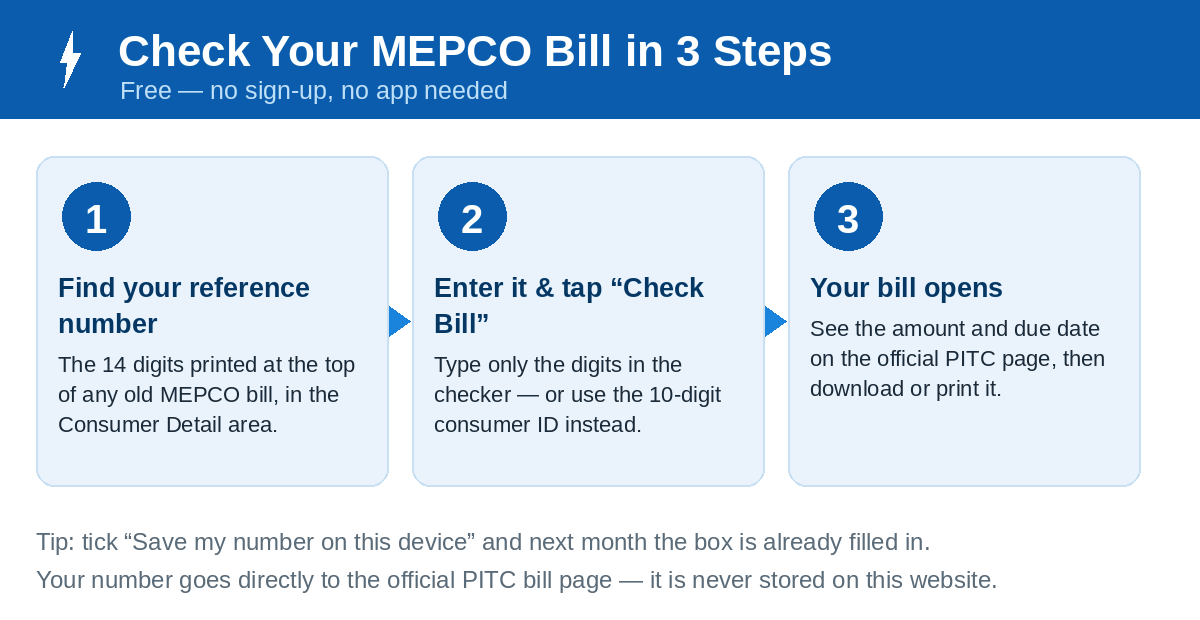
- Find your number. Take any old MEPCO bill and look near the top, in the Consumer Detail area, for the 14-digit reference number — or use the 10-digit consumer ID printed just below it.
- Enter it above and press Check Bill. Type only the digits — no spaces, and leave off the U or R letter at the end of the reference number.
- Your bill opens. The latest bill appears on the official PITC page with the payable amount, due date and units consumed. Print it, save it as a PDF, or pay it straight from your banking or wallet app.
MEPCO bill quick facts
| What you need to know | Detail |
|---|---|
| Official MEPCO website | mepco.com.pk |
| Official bill page | bill.pitc.com.pk/mepcobill (PITC web bill portal) |
| What you need | 14-digit reference number, or 10-digit consumer ID, from any old bill |
| Cost of checking | Free — no account or login required |
| MEPCO helpline | 118 (from landline) or 0800-63726 (toll free) |
| Complaints / customer care | 0319-9757789 • rcc@mepco.com.pk • CCMS portal (see complaint guide) |
| Official app | MEPCO SMART by PITC — app guide |
| Service area | 13 districts of South Punjab (listed below) |
MEPCO (Multan Electric Power Company) distributes electricity across South Punjab from its head office in Multan. Bill records for MEPCO and the other public distribution companies are held by PITC, the Power Information Technology Company, which is why every genuine online bill opens on the PITC portal.
MEPCO areas served
If your home or business is in any of these 13 districts, your bill is a MEPCO bill and can be checked on this page:
- Multan
- Khanewal
- Lodhran
- Vehari
- Sahiwal
- Pakpattan
- Bahawalpur
- Bahawalnagar
- Rahim Yar Khan
- Muzaffargarh
- Layyah
- Dera Ghazi Khan
- Rajanpur
The 13 districts are administered through MEPCO’s nine operation circles. Day-to-day work sits with your local sub-division (SDO) office; the circle office is where an unresolved matter is escalated — and the circle that serves you is also named in the header of your printed bill:
| District | MEPCO circle | District bill page |
|---|---|---|
| Multan | Multan Circle | Check Multan bill |
| Khanewal | Khanewal Circle | Check Khanewal bill |
| Lodhran | Bahawalpur Circle | Check Lodhran bill |
| Vehari | Vehari Circle | Check Vehari bill |
| Sahiwal | Sahiwal Circle | Check Sahiwal bill |
| Pakpattan | Sahiwal Circle | Check Pakpattan bill |
| Bahawalpur | Bahawalpur Circle | Check Bahawalpur bill |
| Bahawalnagar | Bahawalnagar Circle | Check Bahawalnagar bill |
| Rahim Yar Khan | Rahim Yar Khan Circle | Check Rahim Yar Khan bill |
| Muzaffargarh | Muzaffargarh Circle | Check Muzaffargarh bill |
| Layyah | Muzaffargarh Circle | Check Layyah bill |
| Dera Ghazi Khan | Dera Ghazi Khan Circle | Check Dera Ghazi Khan bill |
| Rajanpur | Dera Ghazi Khan Circle | Check Rajanpur bill |
Circle structure follows MEPCO’s published circle and division lists. If your town sits near a district boundary, the circle named on your own bill is the final word for your connection.
What your online bill shows
Amount & due date
The amount payable within the due date, and the higher amount (with late-payment surcharge) if you pay after it — so you always know the deadline that matters.
Units & readings
Units consumed this month, meter readings, and the tariff and taxes applied — the same detail printed on the paper bill delivered to your doorstep.
Payment status
Recent bills show whether the previous bill was paid. See our guide on checking if a bill is paid or not.
MEPCO tariff snapshot — 2026
Domestic per-unit rates under the current NEPRA tariff (S.R.O. 279(I)/2026). Your category depends on your recent usage — most homes that cross 200 units are billed at the unprotected rates.
| Consumer type | Monthly units | Rate per unit |
|---|---|---|
| Protected | 1 – 100 | Rs 10.54 |
| Protected | 101 – 200 | Rs 13.01 |
| Unprotected | 1 – 100 | Rs 22.44 |
| Unprotected | 101 – 200 | Rs 28.91 |
| Unprotected | 201 – 300 | Rs 33.10 |
| Unprotected | Above 700 | Rs 47.20 |
Estimate your bill → with our calculator, or read the full MEPCO tariff 2026 guide including fixed charges, FPA and taxes. Rates are energy charges only; fuel adjustment and taxes are added on the bill.
Tools & guides
Duplicate Bill
Lost your paper bill? Download and print a duplicate copy online.
🧮Bill Calculator
Enter your units and estimate this month's bill before it arrives.
💡Tariff 2026
Slab rates, fixed charges, FPA and taxes — explained simply.
📱Pay Bill Online
Pay through JazzCash, Easypaisa, bank apps or 1Bill, step by step.
✔️Bill Paid or Not
Ways to confirm whether your last bill payment went through.
🔢Reference Number
Where the 14 digits sit on your bill, and what to do if it is lost.
🪪Consumer ID
Check your bill with the 10-digit consumer ID instead.
📣Complaints
Register a complaint via CCMS, helpline 118 or the SMART app.
🔌New Connection
How to apply for a new MEPCO connection and what it costs.
📲MEPCO SMART App
The official app for bills, payments, complaints and alerts.
🕯️Load-Shedding
How to find your feeder's schedule and planned outage timings.
☎️Contact MEPCO
Helplines, customer care numbers and official contact details.
📖Read Your Bill
Every field printed on the bill, explained in plain words.
🕖Peak Hours
TOU timings and how the evening peak rate works.
☀️Solar Net Metering
Apply for solar net metering / net billing with MEPCO.
❓FAQ Hub
Grouped answers on checking, paying and fixing bills.
Frequently asked questions
How can I check my MEPCO bill online?
Where is my MEPCO reference number?
Can I check my bill with a consumer ID instead?
Is checking a MEPCO bill online free?
Can I check a MEPCO bill by CNIC or meter number?
Why did the PITC search page open instead of my bill?
How do I download or print my MEPCO bill?
More questions? Browse the full FAQ hub — grouped answers on checking, paying, wrong bills, connections and solar.